Trust centre
Security, privacy and how access works, in one place.
ConfigCheckup holds privileged read access to the tenants you manage and, where the tenant adds it, the ability to make the changes you approve. This is what we do to deserve it, and where to find the detail your tenants and auditors will ask for.
- Data hosted in the EU (Frankfurt)
- Read-only towards your tenants, except the changes a person approves
- Settings and activity records, never content
- No AI
Reads
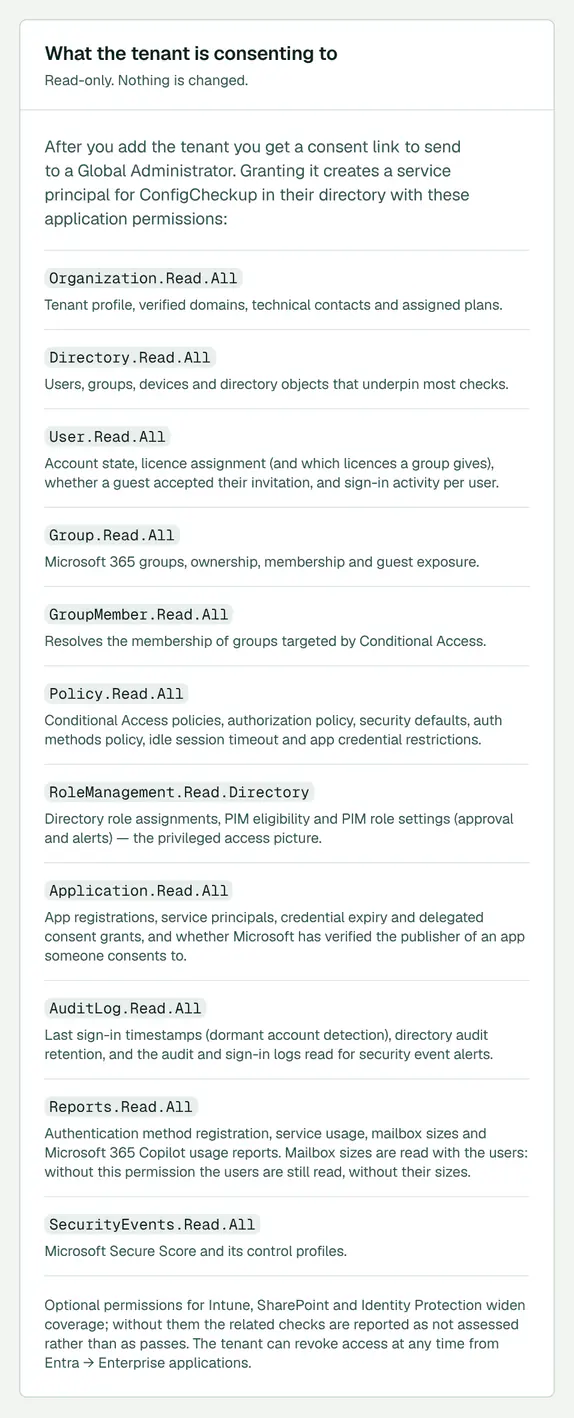
Settings and activity records (such as sign-ins and the audit log), never content, through a read-only app the tenant’s administrator approves. Exchange Online settings are read through the automation app, with the Exchange Administrator role the tenant gives.
Never reads
The body or attachments of any email, or the content of any file, chat or meeting. The automation app holds one file permission, used only when an approved offboarding gives a leaver’s manager their OneDrive. No file is opened.
Changes
Only what you approve, through a second app the tenant adds separately: each change dry-run against the live tenant, approved, logged and read back, with a way back where Microsoft allows one.
Datasheet
What it reads, never reads, changes and cannot do.
For a supplier review, on one printed page. Each row links to its source, and every figure in it is counted from the product’s own code.
- Reads
- Every permission ›
Settings and activity records (such as sign-ins and the audit log), never content.
29 read permissions, all listed.
- Never reads
- What is read and kept ›
The body or attachments of any email, or the content of any file, chat or meeting. The automation app holds one file permission, used only when an approved offboarding gives a leaver’s manager their OneDrive. No file is opened.
- Changes
- Automated fixes ›
Read-only towards your tenants, except the changes a person approves.
Anything that removes or disables is approved by one or two people, your choice per tenant; some higher-risk changes always need two. With two, at least one is not the person who raised it. Changes that only add, and taking one person out of a group or a mailbox, run without approval and can be undone.
- Automatic fixes
- Automatic fixes ›
Only for kinds of change that are not high-risk and either can be undone or change nothing in the tenant, under a standing approval an Admin or Owner gives in their own name.
At most 20 a tenant and 100 a workspace in any 24 hours. Comes with Automate.
- A name on every change
- How a change runs ›
Every change has a person’s name against it: who asked for it or who approved it. An automatic fix is approved in the name of the person who approved the policy.
- Way back
- Every kind of change ›
74 of 88 kinds of change can be rolled back, in whole or in part; rollback is checked against the live tenant first.
- Rules
- Every check ›
Written by people, so the same tenant always gives the same result. No AI.
- Can’t do
- What it is not for ›
Not a 24/7 security operations centre, not a backup of mail or files, not an RMM, not every admin job.
- Where data lives
- Where data is stored ›
The service and its database run in the EU (Frankfurt).
- Who we are
- Who is behind it ›
ConfigCheckup Ltd.
ConfigCheckup datasheet, counted 13 November 2026. Each row’s source is linked at https://configcheckup.com/trust#datasheet.
How we count
Where each figure comes from.
The counts on these pages are computed from the product’s own code when the page is made, never typed in. Each row says where in the product it is counted from, and under it the expression itself, so you can check it.
| What is counted | Today | Counted from |
|---|---|---|
| Security checks | 195 | Counted from the product’s catalogue of checksThe expressionALL_RULES.length (packages/rules/src/catalogue) |
| Security checks with their own public page | 195 | Counted from the checks in the public check libraryThe expressionALL_RULES.filter((r) => CHECK_LIBRARY[r.id]).length (apps/web/src/lib/check-library.ts) |
| Checks whose finding offers a fix as an approved change | 114 | Counted from each check’s fix planThe expressionfixPlanCounts(ALL_RULES).fromFinding (packages/rules/src/fix-plan.ts) |
| Checks fixed by a change straight from the finding | 95 | Counted from each check’s fix planThe expressionfixPlanCounts(…).automated |
| Checks fixed by a change after you make a choice | 19 | Counted from each check’s fix planThe expressionfixPlanCounts(…).automated_after_choice |
| Checks fixed by a change made from another page | 6 | Counted from each check’s fix planThe expressionfixPlanCounts(…).automated_elsewhere |
| Checks with a step-by-step guide only | 75 | Counted from each check’s fix planThe expressionfixPlanCounts(…).guided |
| Kinds of change | 88 | Counted from the product’s list of kinds of changeThe expressionACTION_HANDLERS.length (packages/actions/src/registry.ts) |
| Kinds of change that can be rolled back, in whole or in part | 74 | Counted from the product’s list of kinds of change: each says whether it can be rolled backThe expressionACTION_HANDLERS.filter((h) => h.reversible).length |
| Kinds of change that cannot be undone | 14 | Counted from the product’s list of kinds of change: each says whether it can be rolled backThe expressionACTION_HANDLERS.filter((h) => !h.reversible).length |
| The kinds of change that cannot be undone |
| Named from the product’s list of kinds of changeThe expressionACTION_HANDLERS.filter((h) => !h.reversible).map((h) => h.title) |
| Kinds of change that always need two approvers | 17 | Counted from the product’s list of kinds of change: each says who must approve itThe expressionalwaysTwoApproverTypes().length (packages/actions/src/registry.ts) |
| Kinds of change that run when a named person asks | 16 | Counted from the product’s rules for who approves whatThe expressionACTION_HANDLERS.filter((h) => runsWhenAsked(h.type)).length (packages/actions/src/approval-policy.ts) |
| Kinds of change an automation policy may run under a standing approval | 54 | Counted from the product’s rules for automatic fixesThe expressionACTION_HANDLERS.filter(autoFixAllowed).length (packages/services/src/automation-policy.ts) |
| Frameworks checks are mapped to, as published | 19 | Counted from the frameworks the checks are mapped to that the framework library publishesThe expressionLIBRARY_FRAMEWORKS.length: FRAMEWORKS less HELD_FRAMEWORKS (apps/web/src/lib/framework-library.ts) |
| Frameworks with their own page in the framework library | 19 | Counted from the framework library: every framework but those whose mapping is held backThe expressionLIBRARY_FRAMEWORKS.length: FRAMEWORKS less HELD_FRAMEWORKS (apps/web/src/lib/framework-library.ts) |
| Read permissions the read-only app asks for | 29 | Counted from the permissions the read-only app asks Microsoft forThe expressionREAD_PERMISSIONS.length (packages/graph/src/permissions.ts) |
| Permissions the separate automation app asks for | 24 | Counted from the permissions the automation app asks Microsoft forThe expressionWRITE_PERMISSIONS.length (packages/graph/src/permissions.ts) |
| Automatic changes at most, per tenant in any 24 hours | 20 | The product’s own limit on automatic changesThe expressionSTANDING_LIMITS.perTenantPerDay (packages/services/src/automation-policy.ts) |
| Automatic changes at most, per workspace in any 24 hours | 100 | The product’s own limit on automatic changesThe expressionSTANDING_LIMITS.perWorkspacePerDay |
| Changes drafted at most, per assessment | 15 | The product’s own limit on drafts from one assessmentThe expressionMAX_DRAFTS_PER_RUN (packages/services/src/automation.ts) |
| Minutes in which the person who asked can undo an addition | 30 | The product’s own setting for undoing an additionThe expressionUNDO_WINDOW_MS / 60 000 (packages/services/src/people-admin.ts) |
| When a change is read back from Microsoft after it runs | 10 s, 30 s and 80 s | The product’s own timings for reading a change backThe expressionRECHECK_DELAYS_MS (packages/services/src/fix-checks.ts) |
| Password resets at most in one class change | 30 | The product’s own limit on one class changeThe expressionRESET_CLASS_MAX (packages/actions/src/handlers/helpdesk.ts) |
| Days without a sign-in before a paid licence counts as unused | 90 | The product’s own setting for unused licencesThe expressionDORMANT_DAYS (packages/rules/src/licence-rightsizing.ts) |
| Days without use before a Microsoft 365 Copilot seat counts as unused | 30 | The product’s own setting for unused seatsThe expressionCOPILOT_UNUSED_DAYS (packages/rules/src/copilot-usage.ts) |
| Days before a warranty ends that the register says “ending soon” | 90 | The asset register’s own settingThe expressionWARRANTY_WARNING_DAYS (packages/services/src/asset-register.ts) |
| Months a saving is counted for, from the change that made it | 12 | The savings record’s own settingThe expressionSAVING_COUNTS_FOR_MONTHS (packages/services/src/savings-ledger.ts) |
| Indicative UK licence prices, as of | September 2026 | The date of the product’s indicative price listThe expressionPRICES_AS_OF (packages/graph/src/sku-catalogue.ts) |
| Steps a leaver’s offboarding offers | 14 | Counted from the leaver form’s own list of stepsThe expressionOFFBOARD_STEPS.length (app/(console)/c/[id]/manage/people/people-lists.ts) |
| Releases on the changelog | 223 | Counted from the changelog’s own list of releasesThe expressionshownReleases().length: CHANGELOG filtered by changelogEntryShown |
| Releases in the last 30 days | 46 | Counted from the changelog’s own list of releases, by dateThe expressionreleasesInLast30Days(shownReleases()) (apps/web/src/lib/site2/site-figures.ts) |
| Newest release on the changelog | 12 November 2026 | The date of the newest release on the changelogThe expressionshownReleases()[0].date |
| Oldest release on the changelog | 28 September 2026 | The date of the oldest release on the changelogThe expressionshownReleases().at(-1).date |
Who we are
Who is behind ConfigCheckup.
ConfigCheckup is built and run by ConfigCheckup Ltd, a UK company.
About ConfigCheckup- Company
- ConfigCheckup LtdCompany number 17509228
- Based in
- 20 Wenlock Road, London, England, N1 7GU
- Support and sales
- Security reports
Certifications and documents
- ConfigCheckup does not yet hold an independent certification such as Cyber Essentials, ISO/IEC 27001 or SOC 2. When it does, certificates will be listed here with a link to verify them.
- No independent penetration test of ConfigCheckup has been done yet.
- Data processing agreementUK GDPR Article 28 terms for processing tenant data.Read it
- Security questionnaireAnswers for your or your tenant's supplier review.Ask for it
- Data protection questionsIncluding a signed copy of the DPA.Email us
Found a security issue? Tell us.
We welcome reports from security researchers and customers, and will work with you to understand and fix them.
Email support@configcheckup.com with a description of the issue, the steps to reproduce it and its likely impact. Our contact details are also published in security.txt.
When you test, please:
- only use accounts and workspaces you own or have permission to test;
- never access, change or delete another customer's data, or any Microsoft 365 tenant data;
- avoid anything that degrades the service for others, such as denial of service or automated scanning at volume;
- give us reasonable time to fix the issue before telling anyone else.
We will acknowledge your report, keep you informed while we investigate, and tell you when it is fixed. Social engineering, physical attacks and reports from automated scanners without a demonstrated impact are out of scope.
We do not run a paid bug bounty and do not pay for reports, and a report that comes with a demand for payment is not one we can act on under this policy. Testing within these rules does not give permission to access any data or system beyond what is needed to show the issue.
ConfigCheckup
Satisfied on security? See it on a real tenant.
Connect one tenant with read-only consent, and add the automation app only when you want changes.
14 days of daily monitoring and alerts, every finding with its fix guide, and reports on up to 3 tenants, from your first connected tenant. No card. Then choose the plan that fits.